
Introduction
Website speed optimization means making your pages load and respond quickly, especially on a phone. In Egypt, most visitors reach your site on a mobile phone, and many browse on a data plan with a monthly limit. So a heavy, slow page costs them time and data before they even see your offer.
The good news is that most slow sites suffer from the same few problems. This guide explains Google's Core Web Vitals in plain words. Then it shows how to test your site for free and which fixes make the biggest difference.
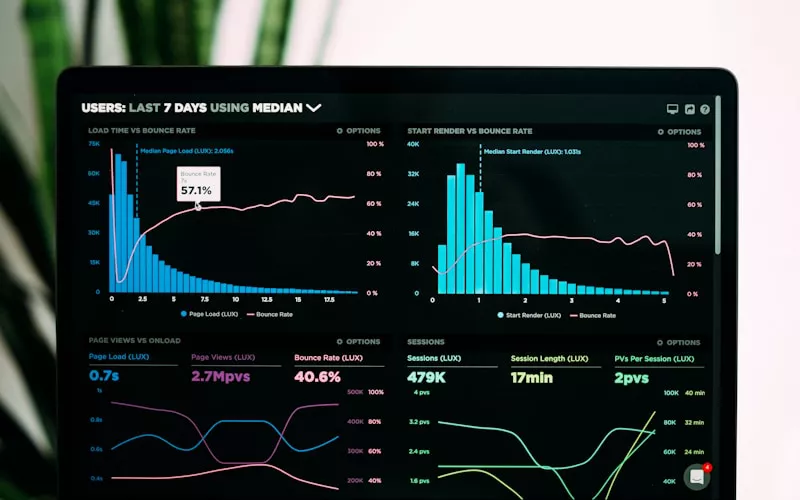
Why Website Speed Optimization Matters in Egypt
Speed is not only a technical detail. It shapes the first impression of your business, because a visitor judges you before the page has finished loading.
- Mobile data: many people watch their data balance. A page full of large photos and videos uses up their quota, so they may close it and choose a lighter site.
- Weak signal: coverage changes between cities, villages, offices and the metro. A light page still opens on a weak connection, while a heavy one stalls.
- Mid-range phones: not every visitor has the latest phone. Heavy JavaScript makes older devices slow to react to taps.
- Search rankings: Google uses page experience signals, including Core Web Vitals, as part of how it ranks pages. Speed alone will not lift a weak page, but a slow page works against strong content.
In short, a fast site keeps more visitors, and more visitors means more chances to get a call or a quote request. That is also why speed is a core part of any serious SEO service.
Core Web Vitals in Plain Words
Google measures page experience with three main numbers, called Core Web Vitals. Each one answers a simple question a visitor might ask. According to Google's Web Vitals guide on web.dev, these are the current targets for a good experience.
LCP: Does the Page Show Up Fast?
Largest Contentful Paint (LCP) measures how long the biggest visible item takes to appear. Usually this is the main photo or the headline at the top. A good LCP is 2.5 seconds or less.
INP: Does the Page React When I Tap?
Interaction to Next Paint (INP) measures how quickly the page responds when someone taps a button, opens a menu or types in a form. A good INP is 200 milliseconds or less. INP replaced the older First Input Delay (FID) metric as a Core Web Vital in March 2024, so older guides that mention FID are out of date.
CLS: Does the Page Jump Around?
Cumulative Layout Shift (CLS) measures how much the content moves while the page loads. For example, you go to tap a button, an image loads above it, and you tap an ad instead. A good CLS score is 0.1 or less.
How to Measure Your Site With PageSpeed Insights
You do not need special software to start. Google's free PageSpeed Insights tool tests any public page. Simply paste your address, run the test and check the mobile tab first, because that is how most of your visitors arrive.
- Read the field data first. If your site has enough traffic, the top section shows how real Chrome users experienced it over the past 28 days. These are the numbers that count.
- Then read the lab score. The score from 0 to 100 comes from a simulated test. It is useful for spotting problems, but it can change a little each time you run it.
- Open the diagnostics. The tool lists the issues behind your score, such as large images, unused JavaScript or render-blocking files.
- Test several pages. Your home page, a service page, a blog post and a product page often have different problems.
Also open your site on an ordinary phone using mobile data, not office Wi-Fi. It shows what a busy customer actually feels.
The Website Speed Optimization Fixes That Matter Most
You can spend weeks on small tweaks. However, a handful of changes usually brings most of the gain. Start with these, in this order.
Images: Right Size and WebP Format
Images are the most common cause of slow pages. Many sites upload a 4,000-pixel camera photo and show it in a box 800 pixels wide. As a result, the phone downloads far more data than it needs.
- Resize each photo to the largest size it will actually appear on screen.
- Convert photos to WebP, a modern format that is usually much smaller than JPEG or PNG at similar quality.
- Serve smaller versions to phones, so a mobile visitor does not download the desktop image.
- Always set the width and height of each image. This reserves space and prevents layout jumps.
Hosting and Caching for Website Speed Optimization
Cheap shared hosting is often the hidden reason a site feels slow. If the server takes a long time to send the first byte, every other fix helps less. So choose hosting with enough resources for your traffic, a recent PHP version if you use WordPress, and good support.
Caching is the next step. Page caching saves a ready-made copy of each page, so the server does not rebuild it for every visitor. Browser caching tells phones to keep your logo, fonts and styles, so the second page opens faster.
Fewer Plugins and Third-Party Scripts
Every plugin, chat widget, slider, tracking pixel and pop-up adds code. Each one may look small, but together they slow the page and hurt INP. Therefore, list every script on your site and ask a simple question: does this help a visitor or bring us leads? If not, remove it.
Arabic Fonts: A Hidden Speed Cost
Arabic web fonts are often larger than Latin ones, because each letter has several shapes depending on its position in a word. If a bilingual site loads two Arabic families and two English families in several weights, the visitor downloads a lot of data just to read text.
- Use one Arabic font and one English font, in two or three weights at most.
- Use the WOFF2 format, which is compressed for the web.
- Load only the character sets each page needs.
- Use font-display: swap, so text appears at once in a system font and then switches to your brand font.
Fonts also affect search in Arabic, since slow text rendering hurts the reading experience. Our guide to Arabic SEO covers the other side of ranking for Arabic searches.
Read moreArabic SEO: A Practical Digital Marketing Guide to Arabic SearchLazy Loading and a CDN
Lazy loading tells the browser to wait before it downloads images further down the page. So a visitor who reads only the top section does not pay for photos they never see. Modern browsers support this with a single attribute on each image.
However, never lazy-load the main image at the top of the page. That image is often your LCP element, and delaying it makes your score worse, not better.
A content delivery network (CDN) keeps copies of your images, styles and scripts on servers in many countries. As a result, files travel a shorter distance to each visitor. This helps most when your server is far from your audience, or when you serve clients in Egypt and the Gulf at the same time.
Website Speed Optimization Checklist
Use this checklist to review your own site, or to brief your developer. Test with PageSpeed Insights before you start, then again after each group of changes.
- Mobile LCP is 2.5 seconds or less, INP is 200 milliseconds or less, and CLS is 0.1 or less.
- Photos are resized, converted to WebP and have a set width and height.
- Images below the first screen are lazy-loaded, but the top image is not.
- Page caching and browser caching are turned on.
- Hosting is fast enough, and the server responds quickly.
- Unused plugins, sliders, pop-ups and tracking scripts are removed.
- Fonts are limited to a few weights, in WOFF2, with font-display: swap.
- A CDN serves static files if your visitors are spread across several countries.
- Speed is tested again after every new plugin, campaign landing page or redesign.
Speed also slips over time, because new content, plugins and updates add weight. That is why a regular website maintenance plan should include a monthly speed check.
Online stores need extra care here, since product pages carry many photos and the checkout depends on scripts. If you sell online, plan for speed from the first day.
Read moreEcommerce Website Development in Egypt: Build a Store That SellsFrequently Asked Questions
What is a good PageSpeed Insights score?
A score of 90 or more is considered good, and 50 to 89 needs work. However, the field data matters more than the score. Focus on passing LCP, INP and CLS for real mobile users.
Does website speed optimization help SEO in Egypt?
Yes. Google uses page experience, including Core Web Vitals, as one of its ranking signals. Content still matters most, but a fast page keeps visitors longer and supports your rankings.
Why is my WordPress site slow?
The usual causes are large images, too many plugins, weak shared hosting and no caching. Start by removing plugins you do not use. Then add a caching plugin and convert your photos to WebP.
How much does website speed optimization cost?
It depends on the size of the site and the cause of the slowness. A site that only needs image and caching fixes takes far less work than one that needs new hosting or a rebuilt theme. You can request a quote after a quick review.
Start Your Website Speed Optimization Today
Website speed optimization is one of the most practical upgrades you can make. Your visitors in Egypt are mostly on phones and often on mobile data, so every extra second and every extra megabyte matters. First, measure LCP, INP and CLS with PageSpeed Insights. Then fix images, hosting, caching, scripts and fonts, in that order.
If your site is slow and you are not sure where to start, our web development service can audit your pages, fix what matters most and build new sites that are fast from day one. Tell us about your website and ask for a quote.
Is Your Website Too Slow?
Send us your site address, and we will tell you what slows it down and what to fix first.
Request a Quote